
Better Messages Integration – Getting Started
Download and Installation
This extension is included in all WP Adverts packages. If you already own a package, you can download the plugin from the Client Panel.
Once downloaded, install and activate the plugin like any other WordPress plugin:
-
Go to wp-admin → Plugins → Add New → Upload.
-
Upload the downloaded ZIP file.
-
Click Install Now, then Activate.
Displaying the “Start Chat” Button
The “Start Chat” button is only available on Ad details pages if you’re using blocks instead of shortcodes. (All recent WP Adverts installations use blocks by default.)
To display the “Start Chat” button:
-
Navigate to wp-admin → Pages and edit your Ad details template (or create a new one if needed, as shown here or here).
-
Click on the Classifieds Single Contact block.
-
In the block settings sidebar, check the “Better Messages” option.
-
Save the page as a Draft.
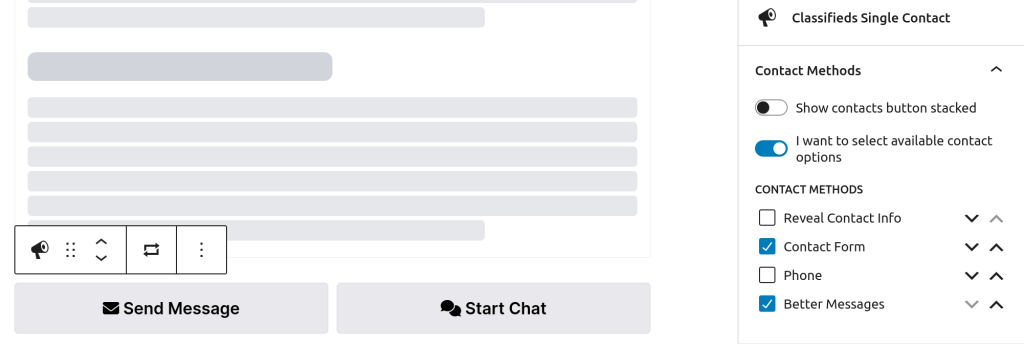
You should now see the “Start Chat” button on Ad details pages.

Configuration
You can configure the Better Messages integration from: wp-admin → Classifieds → Options → Better Messages panel.
Available Settings:
-
Allow Changing Chat Title
If enabled, users can set their own chat titles. If disabled, the title will be generated automatically using the Title Template. -
Title Template
A format for the “Message Subject”. You can use the following placeholders:-
{id}– Ad ID -
{title}– Ad Title -
{price}– Ad Price
-
-
Disable Form When Sold
Prevents users from starting new chats if the Ad is marked as Sold (either via the Mark As Sold extension or manually from the chat window). -
Disable Chat Replies
Choose one or morepost_statusvalues. When an Ad changes to one of the selected statuses, users will no longer be able to reply in the chat window. -
Edit URL
A URL template linking to the Ad edit page. This is usually a page with either the Classifieds Manage block or the[adverts_author_panel]shortcode.
The URL should end with?advert_id={id}to dynamically include the Ad ID.